.webp?width=145&height=145&name=Hubspot%20Platinum%20(1).webp)


How should UAE and GCC teams design HubSpot lead routing? Start with a small set of transparent rules: protect existing account ownership, match new enquiries by territory and service, set a clear fallback, and measure how long a lead waits before a person acts. HubSpot can automate parts of this process, but the quality of the routing still depends on clean data and agreed ownership.
I see lead routing as a sales operating rule, not simply a workflow. A prospect who submits a form from Dubai, Riyadh or Singapore should reach someone who can help, in the right language and time zone, with enough context to respond sensibly. Here is a practical way to design that system before you automate it.
What is HubSpot lead routing?
Lead routing is the set of rules that directs an incoming prospect or sales-qualified lead to the person or team responsible for the next step. In HubSpot, teams commonly use record ownership, workflow branches, assignment actions and notifications to make that hand-off repeatable. Routing should answer three questions: who owns this record, why did they receive it, and what should happen if they cannot act?
Short answer: define eligibility first, apply account ownership before round-robin distribution, add an explicit fallback for missing or conflicting data, and monitor response time and misroutes. Do not rotate every form submission between every rep by default.
Why HubSpot lead routing matters for UAE sales teams
The region’s sales teams often cover multiple markets, languages and service lines from a relatively small team. A Dubai-based account may be managed by a regional owner; an Arabic-language request may need a bilingual colleague; and an existing customer asking about a new project should usually be routed differently from a first-time enquiry. These are operating choices for your business to decide, not rules HubSpot can infer from a country field.
There is evidence for paying attention to the first response, with an important limitation. A 2011 Harvard Business Review study reported that companies trying to contact an online lead within an hour were nearly seven times as likely to qualify it as companies waiting another hour, and more than 60 times as likely as those waiting 24 hours or longer. The underlying research was based on 1.25 million leads from 29 B2C and 13 B2B companies in the United States, and it is from 2011. Treat it as evidence that delay is worth measuring, not as a current UAE conversion forecast or a guaranteed multiplier.
Capacity is another reason to automate repetitive hand-offs. Salesforce’s 2026 State of Sales report surveyed 4,050 sales professionals across 22 countries in August and September 2025. It reports that sales representatives spend 40% of an average workweek selling and 60% on other work; 57% of respondents said customers take longer to decide than before. This global survey is not a UAE-only benchmark, but it supports a practical point: remove avoidable admin while preserving thoughtful, human follow-up.
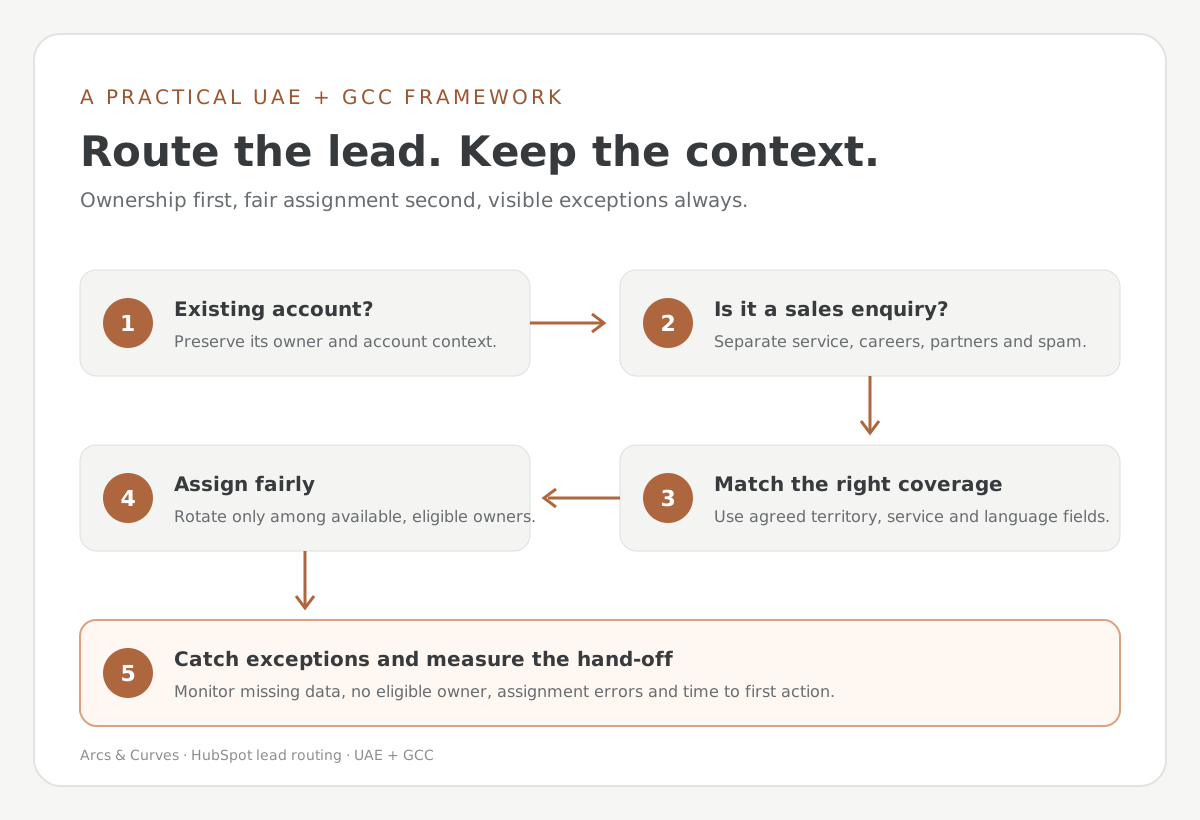
How to plan HubSpot lead-routing rules before automation
I recommend writing the rules in plain language first. If a colleague cannot explain why a record went to a particular owner, the automation will be difficult to trust and harder to troubleshoot.
- Protect current customer and account ownership. If the contact belongs to an existing customer or named strategic account, decide whether the current account owner should keep the relationship. Define exceptions for out-of-territory opportunities and inactive owners.
- Separate enquiry types. New business, existing-customer support, partner referrals, careers enquiries and spam should not enter the same sales rotation. Use a form type, lifecycle or other reliable signal.
- Set market and language rules. Agree what UAE, KSA, Qatar and other GCC coverage means for your team, including accounts that cross borders. Route on data you can maintain, such as selected country, territory, service line or language preference, rather than assuming a free-text field is clean.
- Choose a fair distribution method. Round-robin is useful when eligible reps have similar capacity and responsibilities. Load-balanced assignment can be more suitable when current open workload matters. A random assignment is rarely a good proxy for capacity or specialist fit.
- Define the fallback. Specify a monitored team queue or manager when the territory, service or owner is missing; the selected owner is inactive; or the market has no dedicated rep. An unowned record should create visible work, not disappear.
A HubSpot lead-routing framework for Dubai and the GCC
| Signal | Routing rule | Fallback and check |
|---|---|---|
| Existing named account | Keep the approved company or contact owner | If owner is inactive, send to sales operations for reassignment |
| New qualified UAE enquiry | Route to the UAE team, then distribute across eligible reps | If country or fit is unclear, use a monitored triage queue |
| KSA or other GCC market | Apply the agreed market owner and language preference | Route conflicting territory/account signals for review |
| Specialist service or partner referral | Assign to the designated specialist or partner manager | Alert the team lead if no qualified owner is available |
| Support request or existing customer issue | Create or route to the service process, not new-business sales | Keep sales informed only when an expansion conversation is appropriate |
This matrix is illustrative, not a recommendation to configure these territories without review. Confirm the rules with sales leadership, sales operations and whoever owns existing accounts.
How to configure HubSpot lead routing
HubSpot’s current documentation describes assignment using workflows, including record-owner assignment and owner rotation. The workflow owner-rotation action is subscription- and seat-dependent: HubSpot’s documentation lists Sales Hub Professional or Enterprise and eligible paid seats for the rotation action. Product access changes, so verify the entitlements in your portal before designing around a feature.
- Audit your current properties, forms, owners and assignment workflows. Note duplicates and the source fields that are unreliable.
- Agree on the enrollment criteria. For example: a new, non-customer enquiry with a valid business email and selected product interest.
- Branch by account ownership, region and service line before using rotation. Decide whether existing owner values can be overwritten.
- Add the assignment action and a clear notification or task for the owner. Keep the notification short and include the context the rep needs to act.
- Add an exception path. If required fields are blank or rules conflict, assign to a monitored queue and notify the person accountable for triage.
- Test with sample records before activating. Confirm the assigned owner, notification, overwrite behavior, re-enrolment and fallback for each test case.
For a broader foundation, my HubSpot implementation readiness checklist for UAE businesses covers process ownership and data preparation. If you are moving from another CRM, use the HubSpot CRM migration mapping and acceptance checklist to validate the fields your rules depend on.
How to test a HubSpot lead-routing workflow
Build test records for normal cases and awkward exceptions. At minimum, test:
- A new Dubai lead with complete market and service data.
- An existing customer with a named company owner.
- A KSA or Qatar enquiry where the contact and company country differ.
- A request with missing country, unsupported language or an unknown service.
- An assigned rep who is inactive, unavailable or not eligible for the rotation.
- A repeated form submission, duplicate contact or record with an existing owner value.
Ask sales operations to record expected versus actual owner, workflow branch and notification for each test. Do not enroll all historical records just to test a new assignment rule.
How to measure HubSpot lead-routing quality
Track process health, not vanity volume alone. I would review these measures weekly at first, then adjust the cadence once the rules are stable:
- Unassigned qualified leads: count and age of records awaiting an owner.
- Time to first meaningful action: measure from the agreed start point to a logged call, personal email or meeting—not merely an assignment event.
- Misroute rate: percentage reassigned because the market, account or specialist was wrong, with a reason code.
- Distribution balance: compare eligible assignments alongside open workload, capacity and territory—not only total record counts.
- Outcomes by route: review qualification and opportunity creation by source and rule, while accounting for sample size and differences in lead quality.
A faster assignment is not automatically a better customer experience. The goal is a timely, relevant response from the right person. Avoid treating the historical research figures above as a target or as proof that a workflow caused a revenue change.
Common lead-routing mistakes in HubSpot
- Rotating all leads before checking whether the account already has an owner.
- Using country alone to decide territory without handling cross-border accounts or travel.
- Relying on free-text form entries where a controlled choice would work better.
- Letting the fallback queue exist without an owner, service-level expectation or daily review.
- Changing the eligible owner pool without checking HubSpot’s documented rotation behavior and assignment history.
- Measuring workflow completion instead of first human action, misroutes and qualified outcomes.
Frequently asked questions about HubSpot lead routing
Can HubSpot automatically assign leads to sales reps?
Yes. HubSpot supports owner assignment using workflows, and eligible subscriptions provide record-owner rotation. Exact options and seat requirements depend on your Hub and plan.
Can I route HubSpot leads by country or territory?
Yes, if the routing property is dependable and your team has defined territory ownership. Add exception handling for missing, conflicting or cross-border data.
Does HubSpot offer round-robin lead assignment?
HubSpot documents rotation options in workflows. The available distribution methods depend on the record type and subscription; check current portal entitlements and documentation before launch.
What is the best lead-response time for UAE businesses?
There is no universal response-time target for every industry or sales motion. Set a realistic business-hours service level for each enquiry type, use after-hours acknowledgement where appropriate, and compare performance with your own conversion and customer-experience data.
Should all form submissions enter the sales rotation?
Usually not. Separate new-business enquiries from support, careers, partners, spam and existing-customer requests before assigning sales ownership.
Start with a practical HubSpot lead-routing plan
If your current assignment process depends on someone checking an inbox or spreadsheet, start with one high-volume enquiry type and one market. Document the rule, test the exceptions, then compare unassigned records and first-action times before and after the change. Expand only when the first route is stable.
For help aligning routing rules with your HubSpot data, sales process and regional coverage, see our HubSpot services in Dubai and HubSpot implementation and workflow support. If your team sells complex technical projects, my guide to HubSpot CRM for IT consulting companies explores longer sales cycles and handovers.
Author
Asif Ahmed is the Founder & CEO of Arcs & Curves and a HubSpot Consultant.


-3.jpg?width=596&name=Webp.net-compress-image%20(5)-3.jpg)