.webp?width=145&height=145&name=Hubspot%20Platinum%20(1).webp)


Before you implement HubSpot, agree on your sales process, prepare your customer data, assign internal owners, document integrations, and define what a successful launch must achieve. A useful readiness checklist connects each decision to an owner and an acceptance test. That gives your team a practical way to judge whether the system is ready for everyday use.
For a UAE business, this preparation may also include multiple sales territories, English and Arabic enquiries, regional reporting requirements, and handoffs between office-based teams and field sales. The right starting point depends on how your business works. Copying another company's pipeline rarely answers those questions.
This guide provides a working checklist for leaders preparing a HubSpot implementation. Use it before approving a scope of work, migrating records, or setting a launch date. It is a planning framework, rather than a substitute for reviewing your actual systems and HubSpot subscription.
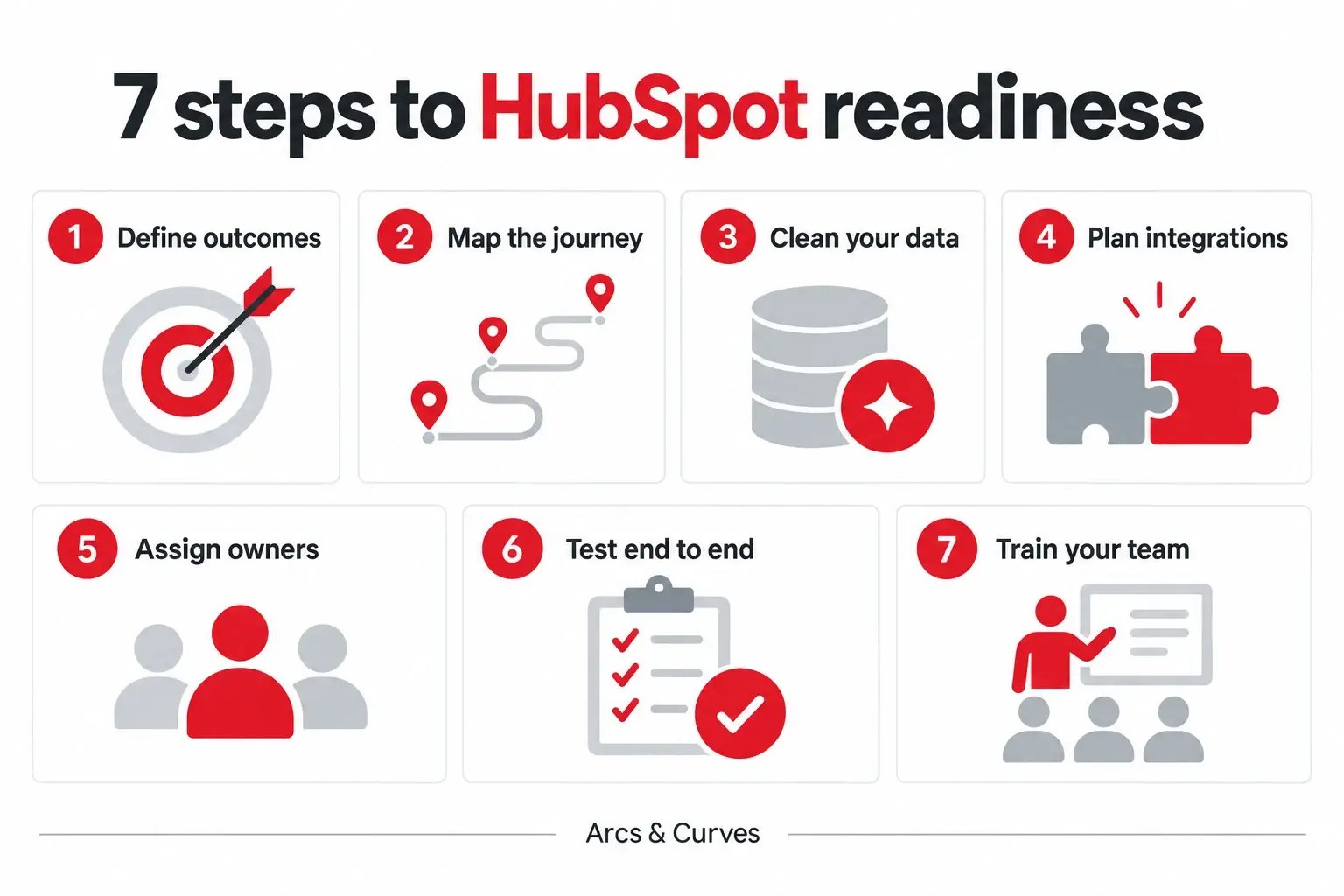
What should you prepare before implementing HubSpot?
Prepare these five essentials before configuring the portal:
- Business outcome: the specific operational problem the first release must address.
- Customer journey: agreed stages, qualification criteria, and handoffs.
- Usable data: records, identifiers, ownership, and relationships that have been checked.
- Integration plan: which systems connect and which source owns each shared field.
- Internal ownership: people who will make decisions and maintain the system after launch.
These become the foundation for configuration, testing, training, and reporting.
Consider an illustrative business with enquiries arriving through its website, events, and referrals. Its immediate problem may be that nobody consistently owns new enquiries. A sensible first release would establish assignment, follow-up, and visibility. Building a complicated scoring model first would leave the immediate operational gap unresolved.
Write a short outcome statement such as: “Every qualified website enquiry must reach the responsible salesperson, and managers must be able to see whether follow-up happened.” Then decide how you will measure it. This is more useful than a requirement that simply says “automate sales”.
1. Define the first business outcome and its baseline
Choose a small number of outcomes for the first release. Possible priorities include reducing unassigned enquiries, making pipeline reviews reliable, or improving the handoff from marketing to sales. Avoid treating every available feature as a launch requirement.
For each outcome, record:
- Baseline: what happens today, including any measurement gaps.
- Target: the specific improvement you want to see.
- Owner: the person accountable for the result.
- Acceptance evidence: the records, tests, or reports that will demonstrate success.
If your team cannot currently measure response time, say so. Establishing that measurement can be a valid first milestone.
Why capacity matters: Microsoft's 2025 Work Trend Index reported that 80% of surveyed employees and leaders lacked enough time or energy to do their work. Its survey covered 31,000 knowledge workers across 31 markets. This is broad workplace research, not a UAE CRM benchmark or proof that HubSpot will solve the problem. The practical implication for your project: identify repetitive work and unnecessary handoffs before deciding what to automate.
Distinguish between an operational measure and a commercial result. Salespeople updating their deals is an adoption measure. More qualified opportunities is a commercial outcome. You need both, because a system can be used frequently without improving the quality of business decisions.
2. Map the customer journey and sales stages
Gather the people who handle enquiries, qualify prospects, prepare proposals, and manage customers. Ask them to describe what actually happens, including exceptions. Identify where responsibility changes and where information is regularly lost.
For each sales stage, agree on:
- Entry condition: what must have happened for the deal to belong here.
- Required information: the fields needed for the next decision.
- Next action: what the responsible person must do.
- Exit evidence: what must be true before the deal advances.
Define the evidence needed to move forward. “Proposal sent” should mean the proposal has actually been issued, rather than that a salesperson intends to write one. Keep the definitions short enough to use during a normal pipeline review.
Also separate contact or company lifecycle stages from the stages of an individual deal. HubSpot's guidance on lifecycle stages explains how these describe progress through your business processes and support marketing-to-sales handoffs. Decide your definitions before introducing automation that changes them.
For teams working across the UAE and GCC, document territory ownership explicitly. For example, decide how to handle a Dubai enquiry from a business whose buying team sits in Saudi Arabia. The answer should come from your operating model, rather than whichever location field happens to be populated first.
3. Audit the data you intend to migrate
List your current sources: an existing CRM, spreadsheets, website forms, event lists, and any other systems that hold customer information. Identify which system owns each important field and who can explain the data.
Check the data for:
- Duplicate contacts and inconsistent company names.
- Outdated owners and missing record identifiers.
- Dates and field values that use incompatible formats.
- Missing relationships between contacts, companies, and deals.
- Historical records that should remain archived rather than enter the first release.
Decide which records should move and which need correction. Preserve a controlled source export so you can investigate migration discrepancies.
Why this deserves attention: Gartner's data-quality guidance cites its 2020 research estimating average annual organisational costs from poor data quality at at least US$12.9 million. This is an older, broad organisational estimate; it is not an expected loss for a UAE SME or a HubSpot implementation. Use it as context for the importance of data quality, then quantify your own avoidable rework and missed follow-ups.
HubSpot's import-file requirements describe how to prepare files, map properties, and use identifiers and associations. Check those requirements against the objects you intend to import. Do a representative test import before committing the full dataset.
Your test should include difficult cases, such as several contacts at one company, a contact linked to more than one opportunity, and records without an email address. Record expected results before testing. A successful upload alone does not prove that relationships and ownership are correct.
4. Decide who owns each system and integration
An integration plan needs more than a list of app names. For each connection, specify:
- Data: the records and fields that move.
- Direction: one-way or two-way updates.
- Timing: when changes should appear in the receiving system.
- Source of truth: which system owns each shared field.
- Exceptions: who investigates a failed or conflicting update.
If both your finance system and HubSpot hold company information, decide which is authoritative for each shared field. Otherwise, the team may create an update loop or overwrite a correction with older information. Assign someone to monitor failures and explain how the team will recover from them.
Treat a messaging, payment, or ERP connection as a requirement to validate. Confirm the connector, commercial terms, supported data, and technical limitations before including it in the delivery promise. Do the same for any feature that depends on a particular HubSpot product or subscription tier.
5. Set permissions and responsibilities
Decide who can configure the portal, edit operational data, approve changes, and view sensitive commercial information. Match access to the work people need to do. Avoid making every user an administrator simply to remove an initial inconvenience.
Assign two responsibilities explicitly:
- Business owner: makes decisions about the process and priorities.
- Day-to-day administrator: manages questions and coordinates system changes.
One person can fill both roles in a smaller business, but the responsibilities still need to be explicit.
Document how new users join, how departing users are handled, and who reviews access. These are ongoing operating tasks. They should have an owner before the implementation partner hands over the system.
6. Test the full journey from enquiry to reporting
Test realistic business scenarios from beginning to end. Submit a test enquiry through the website, check the resulting record, confirm assignment, and follow the intended sales steps. If a notification or task is part of the agreed design, verify that the correct person receives it.
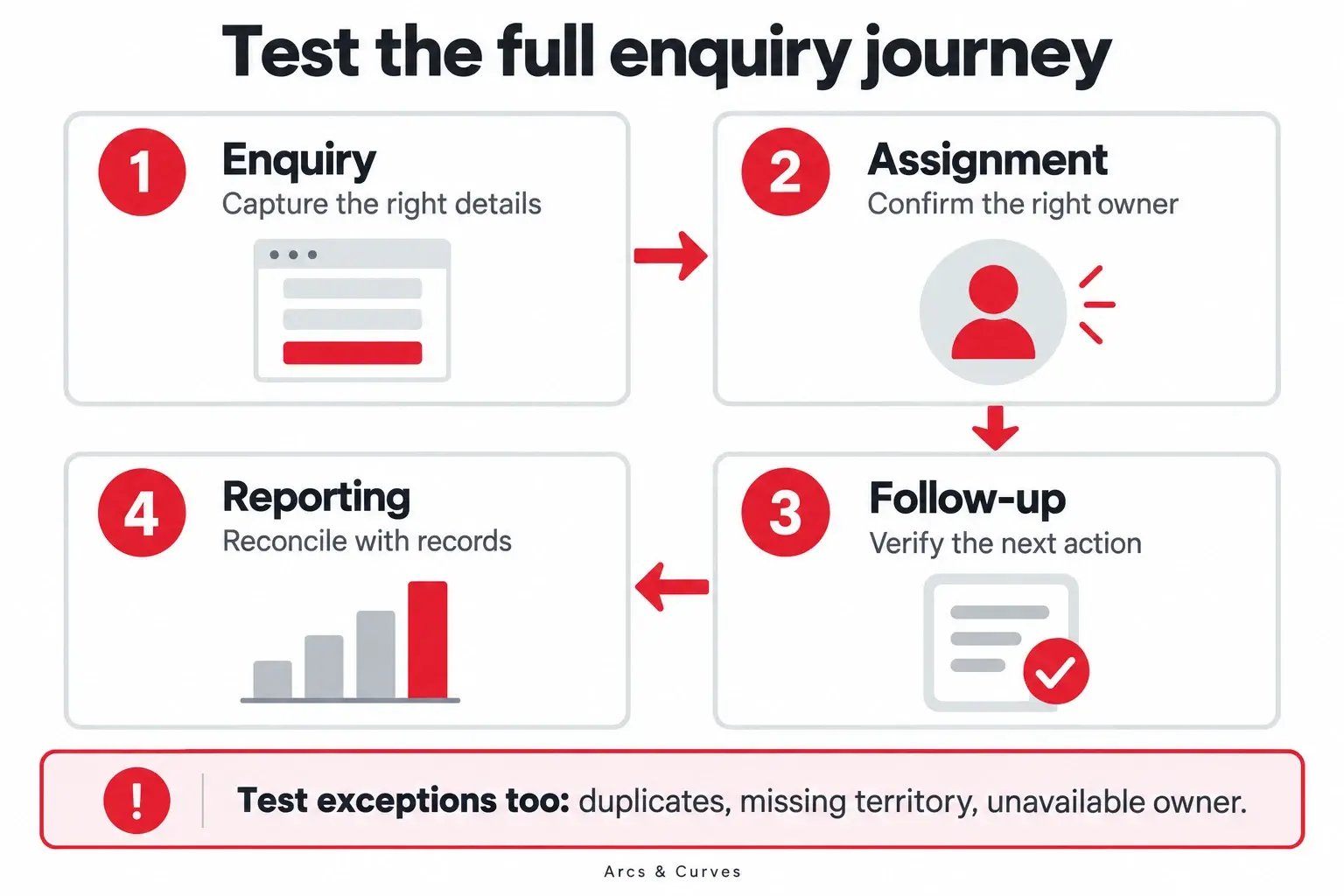
Include exception tests:
- An enquiry arrives without a territory.
- The contact or company already exists.
- The assigned salesperson is unavailable.
- A connected system fails to receive an update.
Record the expected response and actual result for each scenario. A clean demonstration with one perfectly completed form will not expose all the failures your team may encounter.
Finally, reconcile the report with the underlying records. If the dashboard shows five opportunities, the reviewer should be able to identify those opportunities and understand why they qualify. Record defects, assign owners, and agree which issues must be resolved before launch.
7. Train people around their daily work
Build training around daily tasks:
- Handle a new enquiry and confirm ownership.
- Update an opportunity with the next action.
- Find the relevant customer history.
- Review a pipeline using agreed stage definitions.
Give each role a short checklist and a place to ask questions.
Ask users to complete practical exercises themselves. Watching a demonstration is different from successfully completing a task. Managers should also practise the reviews they will run after launch, so the operating rhythm reinforces the new process.
Create a simple change log. If a stage, field, or workflow changes, record why and tell the affected team. This reduces the risk of people following an outdated process after the initial training session.
A practical HubSpot readiness scorecard
Use the table below in your project meeting. Mark each item Ready, Needs work, or Not assessed, and add a named owner. This is an internal planning aid; it is not a HubSpot certification or a predictive score.
| Area | Evidence to request | Acceptance question |
|---|---|---|
| Business outcome | Agreed objective and baseline | Can we tell whether the first release helped? |
| Sales process | Stage definitions and handoff map | Can two team members interpret each stage consistently? |
| Data | Field map and sample migration results | Are records, relationships, and owners correct? |
| Integrations | Data-flow map and exception plan | Do we know what happens when a transfer fails? |
| Ownership | Named business owner and administrator | Who decides and who maintains? |
| Testing | Completed scenarios and defect log | Have we tested the actual customer journey? |
| Adoption | Role-based exercises and review cadence | Can users perform their everyday tasks? |
Do not let a high number of completed items conceal a critical unresolved issue. A missing owner for incoming leads may matter more than several unfinished cosmetic changes. Discuss the business effect of each open item and make the launch decision accordingly.
How should you use this checklist with an implementation partner?
Ask the partner to turn the checklist into a clear scope with deliverables, responsibilities, dependencies, and acceptance criteria. Confirm what your own team must provide and how changes to scope will be handled.
If you are still comparing agencies, read our guide to choosing a HubSpot implementation agency. Then use this readiness checklist to make the first discovery discussion specific to your business.
You can also explore Arcs & Curves' HubSpot services in Dubai and onboarding and implementation services. Bring your current process, system list, and main operational challenge to that discussion. They will help define a more useful scope than a general feature wish list.
Frequently asked questions
Can we start before all our data is clean?
You can begin discovery and process design while data preparation continues. Agree which data is essential for the first release, and test a representative sample before the full migration. Do not assume that importing an entire historical database is necessary for launch.
How long should a HubSpot implementation take?
The schedule depends on the scope, data quality, integrations, internal availability, and testing requirements. Ask for a milestone plan that identifies these dependencies. A fixed date without agreed deliverables is difficult to evaluate.
Do we need every HubSpot Hub at the start?
Start with the capabilities required for your agreed business outcomes. Validate the current subscription and feature requirements during scoping. Add further capabilities when there is a clear use case, owner, and adoption plan.
What should happen after launch?
Review adoption, data quality, unresolved issues, and the business measures agreed at the beginning. Maintain a prioritised improvement backlog. Treat launch as the start of an operating process that your team can keep improving.
Prepare a clearer implementation brief
A successful preparation phase leaves your team with decisions it can act on: what to build first, who owns it, what data is needed, and how to check the result.
If you are planning a HubSpot implementation in the UAE or GCC, talk to Arcs & Curves about your requirements. Share the process you want to improve and the systems you use today. We can discuss the scope and next steps around those needs.