.webp?width=145&height=145&name=Hubspot%20Platinum%20(1).webp)


Step right into our newest blog article series, where we're spotlighting the freshest updates straight from HubSpot in 2024!
This edition is all about the latest enhancements to HubSpot CRM, aimed at smoothing your processes, and giving your marketing and sales teams unprecedented capabilities.
Let's dive in and explore these updates together!
What's inside:
1. Mobile Prospecting Workspace - MVP
2. New Email Template Selection Page & E-Commerce Templates
4. Module Placeholder for Programmable Email
5. Set a unique sound for every notification
Mobile Prospecting Workspace - MVP

Hubspot is bringing the prospecting workspace to the HubSpot mobile app to help users prospect and qualify leads from anywhere. This first MVP version of the mobile prospecting workspace will help BDRs, SDRs, and full-cycle sales reps with the basics of lead management when on-the-go, including:
- Lead navigation through the different defined lead stages
- Lead outreach, and
- Lead qualification
Until now, prospecting on-the-go meant jumping around the mobile app across many features, like tasks, activity feed, contact or company records, etc. This meant having to (re)gain context for every lead the reps wanted to work on, having to dive in and out of each lead to then decide what action to take next.
On the other hand, there was no such thing as the Lead record on mobile, where leads can be properly represented as an existing entity. This implied each rep had its own defined process to prospect and it was up to each of them how to best utilize HubSpot’s mobile app to manage leads.
The new mobile prospecting workspace enables a standardized approach to prospecting, aligning the desktop and mobile experience, enabling continuity between channels and streamlining the process to become more effective at qualifying leads.
How does it work?
You can access the solution by tapping Menu > Prospecting (under the new Workspaces section) from the HubSpot mobile app. There they can navigate the full leads pipeline and switch across the different defined lead stages (eg: new, attempting, connected, etc).
Reps will be able to select a given lead object and engage directly from there (no need to access the associated contact/company) by calling, emailing, texting, scheduling a meeting or sequence enrolling. Finally, as leads progress through the pipeline, reps will be able to update their lead status to a point of qualifying or disqualifying leads and take predefined actions from there (eg: create a deal or log the disqualification reasons).
The mobile prospecting workspace is now available on iOS for Sales Hub Pro and Enterprise paid seated users. To access the workspace please download the latest version of the HubSpot mobile app from the App Store. Should you wish to participate in this private beta release don’t hesitate to opt-in by clicking on ‘Join Beta’ under the Product Updates section of your portal.
New Email Template Selection Page & E-Commerce Templates

The redesign of the Marketing Email Template Selection Page improves segregation of native templates, and comes with five brand new Ecommerce templates.
The refreshed Marketing Email Template Selection Page organises HubSpot provided templates by email intent, allowing users to quickly find a template that suits their needs. As part of the redesign launch, five new Ecommerce templates are available to choose from.
How does it work?
- Navigate to Marketing > Email.
- Click Create email
- Select your email type > Regular or Automated
- A new layout organising HubSpot default templates by category will be displayed
- Click the Ecommerce tab to view the new Ecommerce templates available

Workflows Health Tab
All workflows users will now see a summary of the number of workflows with potential issues and the number of unused workflows in their account.
With most workflow customers having dozens of active workflows, users need a quick way to see potential health risks across all of their workflows.
The Workflows Health Tab sits next to the Manage and Analyze tabs. Use it to quickly uncover potential health risks across your workflows, including:
- Similar workflows — a list of workflows that may be redundant or in conflict with other workflows (Enterprise Hubs only)
- Workflows with issues — a summary and graph of the number of workflows with any issues over time
- Unused workflows report — a summary and graph of the number of unused workflows over time
How does it work?
Navigate to the Workflows page, and select the new Health tab.
Enterprise users will see a searchable table of workflows that have similarities to other workflows. Each workflow shows the count of workflows that are similar to it.

Choose any workflow in the list to see more information. The side panel shows the list of similar workflows, grouped by the type of similarity. From here, users can click any of the similar workflows to edit them.

For all Pro+ workflow customers, below the similar workflows table, all users will see summaries and graphs of the number of workflows with issues and the number of unused workflows over time.

Module Placeholder for Programmable Email

The new Programmable Email Placeholder Module will help hide any unresolved code in an email template while in the Marketing Email Editor, and will update as soon as the Marketing Email is previewed as a particular contact record, and upon send.
How does it work?
If a Marketing Email template or module contains custom code with unresolved HubL, the placeholder module will be displayed in it's place, allowing users to create the rest of their email around it. The module is a placeholder only, and will not be visible after you preview your Marketing Email as a particular contact record, or when you send the email.
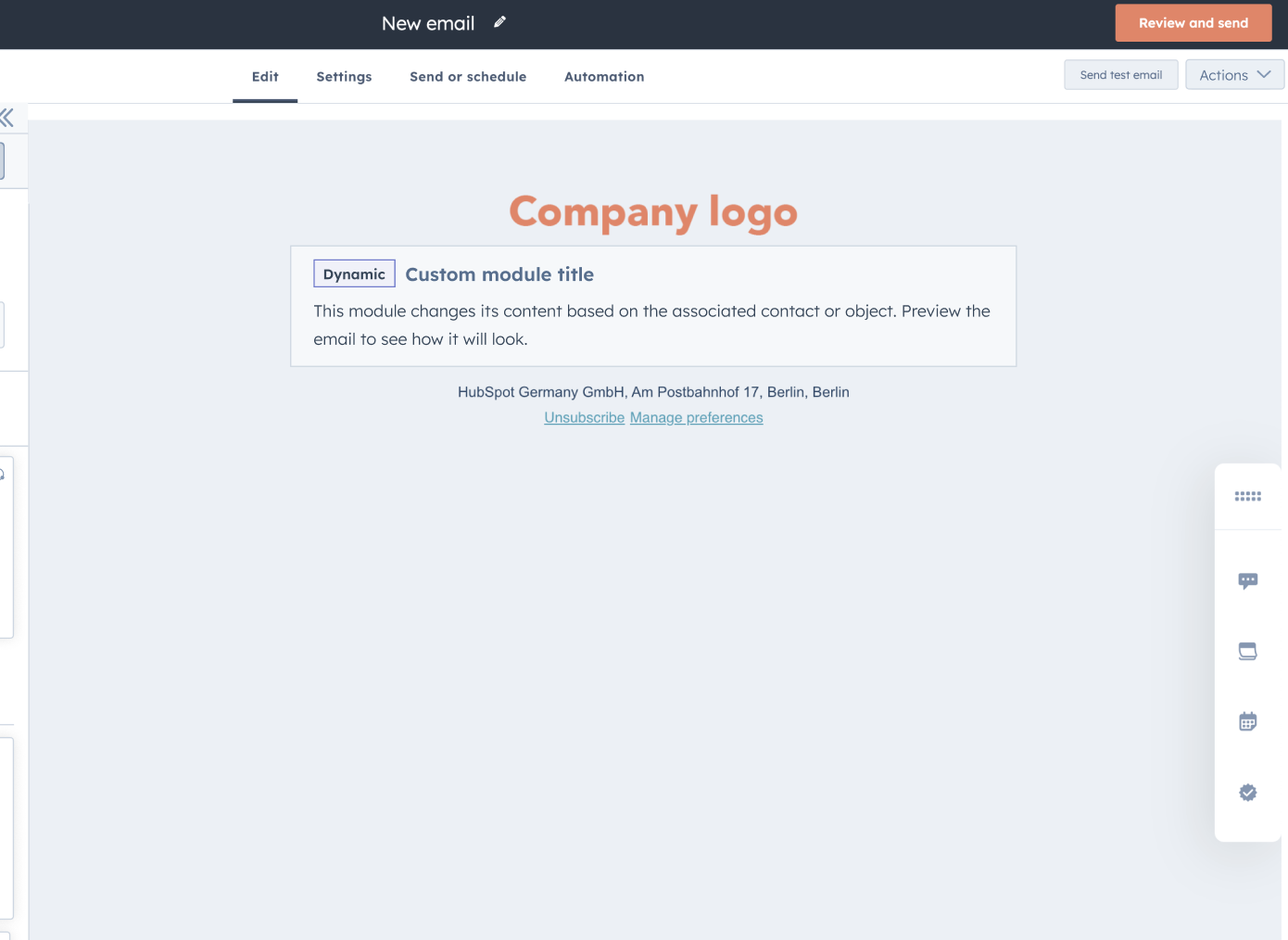
To preview how your email will look like without the Placeholder Module:
- Select Preview > Preview as a contact.
- Next to Preview as a specific contact, users can select a contact record in the dropdown.
To test send how your email will look like without the Placeholder Module:
- Select Preview > Send test email.
- Under the Receive email previewing dropdown, select your chosen contact record.
- Click Send test email.

Set a unique sound for every notification
You can now select from a selection of 6 different sounds as your default sound for desktop notifications (as shown below).The sounds have different lengths and tones so that you can select the sound that works the best for you.

You can also set a unique sound for each specific notification so that you can differentiate between them (as shown below).

As there was only one default notification sound for desktop notifications, if a specific type of notification mattered more to you, you couldn't tell that it had arrived as every other notification had the same sound. Because of this, it was easy to miss an incoming chat or ticket that was crucial for the business.
How does it work?
For changing the default desktop notification sound, head to Settings > Notifications > Desktop

For changing a specific sound, scroll down to your Notification Preferences and select a notification to change the sound for.