.webp?width=145&height=145&name=Hubspot%20Platinum%20(1).webp)


Choosing a CRM can feel straightforward until the quotes arrive. One subscription looks affordable, another costs considerably more, and every demonstration seems to promise a better organised business.
If you are comparing HubSpot, Zoho and Odoo, I would start by asking what your team needs to do together over the next three years. The answer matters more than the price of a user licence. A CRM becomes part of how enquiries are handled, opportunities are reviewed and customers are looked after. Those everyday decisions are where its value has to show up.
My view is that HubSpot can justify a higher price when your priority is a connected marketing, sales and service operation, and your team will actively use that connection.
Zoho deserves serious consideration when a capable CRM or broader application suite fits your requirements at a lower total cost.
Odoo deserves particular attention when the CRM decision is part of a wider change involving accounting, stock, purchasing or other operational processes.
I want to explain where I would make the case for HubSpot, what evidence I would ask for, and when I would choose differently. Arcs & Curves provides HubSpot services, so that commercial perspective should be clear. This is a source-based buying guide with my recommendations, rather than a controlled hands-on benchmark of three identical implementations. Prices and packaging were checked on 29 September 2026; confirm the final regional offer and scope before purchase.



First, compare the right products
“HubSpot versus Zoho versus Odoo” can describe very different purchases. Comparing one vendor’s sales subscription with another vendor’s complete customer-facing suite produces an attractive table but a poor buying decision.
HubSpot describes its platform as several products connected through Smart CRM.
Zoho offers standalone CRM as well as CRM Plus and Zoho One.
Odoo offers CRM within a broader application suite.
I would put each proposal into one of three scopes before discussing price:
- Sales CRM: contacts, companies, deals /opportunities, activities, sales processes and management reporting.
- Customer-facing platform: the above plus the marketing, website, support and customer communications capabilities you actually need.
- Business operations suite: the above plus requirements such as accounting, inventory, purchasing, projects or manufacturing.
The same business might need all three, but it does not follow that one product should own everything. Keep a working finance system if replacing it creates little value. Equally, do not bolt together several systems simply because you started the discussion with a sales team.
| Your main buying question | Where I would start the evaluation | What would change my recommendation? |
|---|---|---|
| How do we connect demand generation, sales follow-up and service? | HubSpot and a properly scoped Zoho customer-facing suite | Demonstrated workflow fit, adoption and the full recurring cost |
| How do we give a budget-conscious sales team a capable CRM? | Zoho CRM alongside the appropriate HubSpot tier | Whether the additional HubSpot capabilities produce measurable value |
| How do we connect sales to stock, purchasing and accounting? | Odoo as a broader operations project | Existing systems, migration complexity and the need for specialised customer-facing tools |
| Should we replace a CRM that already works? | A review of the present system first | Clear evidence that the benefits exceed switching costs |
This is a starting shortlist, not a score awarded to the software. Your requirements should decide which proposal advances.
Why I would consider paying more for HubSpot
1. A clearer path from an enquiry to an ongoing customer relationship
Consider a B2B services business. Someone reads a service page, submits a form, talks to a salesperson, becomes a customer and later raises a support question. The business wants the next person in that chain to understand what has already happened.
The attraction of HubSpot is the opportunity to design that journey around connected customer information. I would evaluate it as a shared working environment for customer-facing teams. The commercial benefit could be fewer handoff mistakes, less repeated data entry and a clearer view of what needs attention. Those are benefits to demonstrate in your configuration, not outcomes guaranteed by the platform name.
Zoho is a meaningful alternative here. Its CRM Plus proposition explicitly brings sales, marketing and service together. I would not accept a comparison that gives HubSpot credit for a connected suite while treating Zoho as an isolated contact list. Ask both suppliers to demonstrate the same journey, with the exact applications included in their quotations.
For HubSpot, the premium becomes easier to defend if your team can complete that journey with fewer manual steps and less maintenance. If both proposed configurations work equally well, the lower-cost option has a stronger case.
2. A useful connection between marketing activity and sales decisions
I would want a marketing manager to answer practical questions: which enquiries became suitable opportunities, which opportunities progressed, and where did follow-up stop? A report becomes valuable when someone can use it to change a campaign, qualification rule or sales action.
HubSpot’s attribution reporting documentation describes reports that allocate credit to customer interactions, with availability dependent on the subscription and report type. Its attribution definitions also explain how interactions and associations affect the calculation. Ask for the exact report you need to be built in the proposed tier; a generic “reporting included” line is insufficient.
I would give HubSpot an advantage in a particular buying exercise if it makes those questions easier for that business to answer and act on. That is an evaluation criterion, rather than a claim that Zoho or Odoo cannot report across functions.
There is also a limit to what any dashboard can tell you. Attribution assigns credit according to a model; it does not prove that a campaign caused a sale. Missing associations, inconsistent stage definitions or untracked offline interactions can distort the picture. Budget for data discipline as well as software.

3. More useful time for the people who run the system
The CRM licence is visible on an invoice. The time spent correcting assignments, rebuilding reports and explaining inconsistent data is much less visible. I would include both in the evaluation.
My hypothesis for a suitable HubSpot implementation is that an administrator and the commercial teams may be able to make routine improvements without continually handing work to a developer. Whether that is true depends on the change, subscription, integrations and skills involved. It needs a test.
Give each shortlisted supplier three changes: add a qualification field, change a routing rule and amend a management report. Ask a future administrator to perform them after training. Record completion time, assistance required and any new licence dependency. Repeat the exercise with an exception, such as a territory manager being absent.
This is a more credible way to discuss ease of use than calling a product “intuitive”. If HubSpot performs better in your test and those changes happen frequently, you have a basis for valuing the difference. If your Zoho administrator can make them just as effectively, retain that evidence too.
4. A platform that supports the next phase without an unnecessary migration
A three-person sales team and a business with separate marketing, sales and customer service functions have different needs. I would consider the next credible phase of the business, while resisting the temptation to buy for every imaginable future scenario.
HubSpot is worth evaluating when the roadmap involves deeper coordination among those teams. The potential benefit is continuity: retaining agreed definitions, history and processes as the scope expands. However, continuity can still involve extra products, higher editions, implementation work and additional seats.
Write down the trigger for each upgrade. Perhaps you need a new reporting capability, a different permission model or a customer service workflow. Ask for the incremental annual cost and the work needed to activate it. That tells you whether the proposed growth path is affordable.
I would never justify today’s premium with a vague claim that the business will “outgrow everything else”. Zoho and Odoo also serve complex organisations. The relevant question is which configuration supports your expected changes at an acceptable cost and level of effort.
Where Zoho may offer better value
Zoho should remain on the shortlist when the sales requirements are clear, the licence budget is constrained, and the business has someone who can own configuration and ongoing administration. An existing investment in Zoho applications can strengthen that case because you should evaluate what can be retained.
Its edition comparison lists capabilities and limits across plans. For example, Blueprint availability and capacity vary by edition. Zoho’s Blueprint explanation describes defining and enforcing business processes. A business with structured stage transitions should test that capability directly rather than assume a higher-priced competitor handles its process better.
I would be particularly careful with bundle comparisons. Zoho One’s pricing distinguishes an all-employee model from flexible-user licensing. The all-employee offer requires licences for all employees on payroll. A price multiplied only by the sales team may therefore misrepresent that option.
My recommendation would favour Zoho if it meets the required workflows, the team can operate it confidently, and the complete quotation remains materially lower. Paying more for features that will sit unused is difficult to defend. HubSpot should earn the difference through a relevant operational advantage.
Where Odoo may be the stronger business decision
If your sales process is tightly connected to stock availability, purchasing, fulfilment or accounting, the scope is wider than CRM. I would want an operations leader in the evaluation alongside sales and marketing.
Odoo’s pricing page lists a broad application suite, including CRM, accounting and inventory. Standard uses Odoo Online; Custom includes options such as Studio, multi-company and external API access. That breadth can make it attractive when you genuinely intend to replace several operational tools. Its current subscription FAQ separately identifies implementation, certain usage credits, Odoo.sh hosting and custom-code maintenance as exclusions.
For this kind of business, a narrowly framed HubSpot comparison can miss the largest benefits on the Odoo side. Avoid counting only the CRM subscription while ignoring tools an Odoo implementation could replace. Equally, include the work and disruption required to replace them.
HubSpot could still be appropriate for customer-facing activity while Odoo supports operations. I would consider that combination only after defining ownership of customers, products, orders and financial information. Specify what moves between the systems, which direction it moves and how failures are detected. Two systems with clear responsibilities can be useful; two competing versions of the same customer record create work.
Pricing: what the headline number leaves out
The following is a dated pricing snapshot, not a like-for-like quotation. Currencies are left as displayed by the vendor pages, so do not compare the raw numbers across rows. Local terms, taxes, billing cadence and promotions must be confirmed in writing.
| Product and source | Displayed starting price checked 29 September 2026 | Important scope note |
|---|---|---|
| HubSpot Sales Hub Professional — product catalogue | USD 100 per seat/month; USD 1,500 required one-time onboarding | Catalogue starting price; obtain the applicable billing offer. This is not the price of the complete marketing, sales and service stack. |
| Zoho CRM — UAE currency selection, annual billing | Standard AED 51; Professional AED 84; Enterprise AED 146 per user/month | Standalone CRM editions; taxes additional. Quote CRM Plus or Zoho One separately if required. |
| Odoo Standard — displayed yearly option | USD 13.50 per user/month introductory; displayed non-discounted reference USD 16.90 | Discount applies for 12 months to initial users ordered. Confirm applicable renewal pricing. |
| Odoo Custom — displayed yearly option | USD 25.50 per user/month introductory; displayed non-discounted reference USD 32.00 | Odoo.sh hosting is additional when used; implementation is separate. |
Sources: HubSpot catalogue, Zoho CRM pricing, Odoo pricing and exclusions. These starting points describe different capabilities. They cannot establish a winner on their own.
For HubSpot, request a quotation showing the products, editions, seat types, contact allowances, onboarding and usage-based components. Its catalogue distinguishes Core, Sales and Service seats, and includes credit-based capacity for some features. A low initial contact volume or a promotional offer should not become your permanent budget assumption.
For all three proposals, I would ask for a year-two renewal scenario and a growth scenario with more users and higher volumes. Include partner services, integration subscriptions and internal administration. Clarify what onboarding delivers: access to guidance is a different scope from cleaning data, building workflows, testing integrations and training every user.
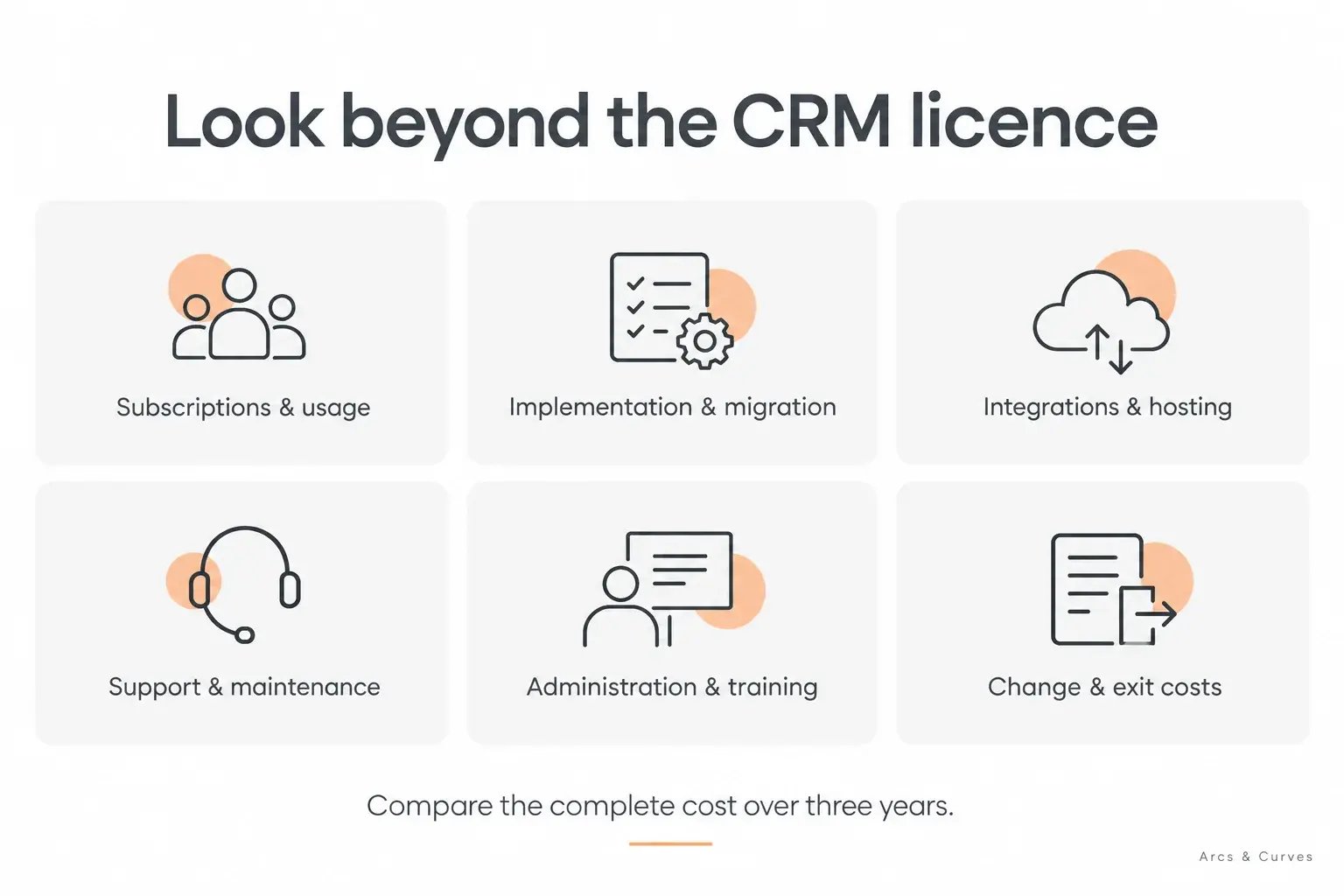
Build a three-year cost model before claiming savings
Here is the calculation I would use:
Three-year ownership cost = subscriptions and usage + implementation and migration + integrations and hosting + support and maintenance + internal administration and training + agreed exit costs.
Keep the cash budget separate from the economic value of staff time. A reduction in manual work is useful, but it only becomes a cash saving if it changes actual expenditure. Otherwise, describe it as capacity that can be redirected.
| Cost line | What to enter for each vendor | Evidence to request |
|---|---|---|
| Year 1 subscriptions | Products, paid user types, volumes and first-year discounts | Itemised quotation |
| Years 2 and 3 | Renewal basis, additional users and expected volume changes | Contract terms and growth quotation |
| Implementation | Discovery, configuration, testing and project management | Defined deliverables and acceptance criteria |
| Migration | Data cleaning, history, attachments and relationships | Sample migration and reconciliation plan |
| Integrations | Connector fees, setup, monitoring and fixes | Demonstrated data flow and support owner |
| Internal effort | Administrator hours, training and recurring manual tasks | Pilot observations and realistic hourly cost |
| Change and exit | Enhancements, exports, documentation and transition work | Agreed scope, rates and export test |
I would make the assumptions visible beside every number. A supplier estimate, a measured pilot result and a guess are different kinds of evidence. Do not combine them into a precise-looking total without showing which is which.
An illustrative break-even calculation
Suppose the fully scoped HubSpot option costs AED 30,000 more per year than an alternative. This is a hypothetical difference, not a vendor quote or an Arcs & Curves client result. At an assumed fully loaded staff cost of AED 150 per hour, it would take 200 hours of genuinely useful capacity per year to match that premium: approximately 16.7 hours per month across the team.
| Assumed useful hours released per month | Annual capacity value at AED 150/hour | Difference versus AED 30,000 annual premium |
|---|---|---|
| 8 | AED 14,400 | AED 15,600 short |
| 16.7, rounded | Approximately AED 30,000 | Approximately break-even |
| 25 | AED 45,000 | AED 15,000 above premium |
That does not prove HubSpot will save those hours. It tells you what to test. Measure time spent preparing reports, correcting handoffs and maintaining integrations before and during the pilot. Use the same tasks and comparable users. Count a time saving once, even if several features contribute to it.
Over three years, a constant AED 30,000 annual premium totals AED 90,000 before discounting. Add any difference in one-time implementation costs before comparing benefits. If the pilot fails to demonstrate enough value, revise the scope or choose the alternative. I would also keep any revenue-uplift assumption separate from labour benefits; it requires its own evidence.
Run the same demonstration on all three systems
I would send a short test script before the sales presentations. Use fictional records, agreed volumes and the actual proposed edition. Ask suppliers to identify anything that requires another product, paid connector or custom development.
- Capture an enquiry with source information and assign it to the correct person.
- Reassign it when that person is unavailable, while retaining an audit trail.
- Turn it into an opportunity linked to the right company and contacts.
- Prevent progression when a required qualification detail is missing.
- Show a manager where opportunities are stuck and how the figures were calculated.
- Hand a won customer to the next team with the relevant history.
- Correct a duplicate and show how the correction affects connected systems.
- Export a sample record with the history and relationships you would need to leave.
Then let your own users repeat the important steps. A polished supplier demonstration establishes possibility; a user exercise tells you more about day-to-day fit. Record failures and assistance, not just completion times. A faster task with incorrect data is not a better result.
A decision scorecard you can adapt
I would agree the weights before the demonstrations to reduce the temptation to favour whichever presentation feels most impressive. Treat essential requirements as pass/fail gates. A platform that cannot meet an essential requirement should not win through points elsewhere.
| Criterion | Illustrative weight | Evidence |
|---|---|---|
| Fit for your end-to-end customer process | 25% | Completed common test script |
| User and administrator adoption | 20% | Observed exercises after equivalent training |
| Three-year ownership cost | 20% | Itemised and normalised cost model |
| Reporting and data integrity | 15% | Reconciled reports and exception tests |
| Integration and maintenance effort | 10% | Working interfaces, monitoring and responsibilities |
| Growth, governance and exit readiness | 10% | Growth quotation, access checks and export test |
Score each criterion from one to five, with an explanation and evidence link. The weighted result is the sum of each score multiplied by its weight. These are my suggested weights, not a researched universal ranking. An operations-led business may reasonably give ERP process fit more weight; a professional services firm may prioritise customer follow-up and reporting.
What UAE and GCC buyers should check separately
Regional suitability is more specific than a vendor having a local sales office. I would include your actual countries, teams and working practices in the test brief.
- Languages: distinguish interface language, Arabic data entry, right-to-left documents and customer-facing content. Test the exact requirement.
- Currencies: demonstrate the transaction currency, reporting currency and the exchange-rate method your reports need.
- Communications: verify the exact WhatsApp, calling or messaging workflow, including third-party charges and regional availability.
- Finance: if invoices or accounting are in scope, have the responsible finance team validate the configuration and outputs.
- Data governance: have your legal and security owners review hosting, subprocessors, access, retention and contractual requirements for your business.
- Support: agree coverage during your working hours, escalation routes and who handles an integration failure involving several suppliers.
I would not infer that a product meets your legal or operational requirements from a logo or a generic compliance page. Make the relevant checks part of procurement and acceptance.
Plan for adoption, maintenance and an eventual exit
The first month should establish a usable process, not an impressive collection of automation. Name the process owner, the administrator and the person who approves data definitions. Give users a small set of actions they can complete reliably. Review missing fields, overdue follow-ups and exceptions before adding complexity.
At 90 days, I would compare the promised benefits with actual use. Are opportunities updated without repeated chasing? Can the sales manager reproduce the pipeline report? Have teams stopped maintaining a parallel spreadsheet? Those observations tell you more than the number of licences activated.
An exit plan belongs in the original decision too. Test what you can export, including associations, attachments and activity history relevant to your scope. Keep integration mappings and configuration decisions documented. Customisation creates dependencies in any platform; understand them while you still have negotiating room.
If you are switching systems, our HubSpot CRM migration checklist provides a field-mapping and acceptance framework. Use it to turn “the data is migrated” into checks the business can actually sign off.
Frequently asked questions
01. Is HubSpot better than Zoho CRM?
It can be a better fit when connected customer-facing workflows and adoption justify its full cost. Zoho may offer better value when it meets the same requirements at a lower ownership cost. I would decide using a common pilot and an itemised quotation, rather than brand preference.
02. Is HubSpot a replacement for Odoo?
That depends on what Odoo is doing. A sales-only requirement is different from a business relying on accounting, inventory and operational applications. Define the replacement scope first. A combination may be appropriate, but only with clear data ownership and integration responsibilities.
03. Is HubSpot always more expensive?
No single answer covers every edition, bundle, team size and usage level. HubSpot can have a higher subscription cost in a particular comparison, but the total depends on scope and terms. Compare complete written proposals, including renewals and implementation, in the same currency.
04. Will a more expensive CRM improve sales?
The price itself will not. Better follow-up, usable information and clearer processes may help, provided people use them. Agree baseline measures and review actual outcomes. Do not treat a supplier case study or a hypothetical calculation as a forecast for your business.
05. Should we choose based on AI features?
I would test specific tasks: a useful summary, an accurate recommendation or a well-controlled automated action. Check output quality, permissions, human review and usage costs. A long AI feature list is less useful than evidence that one relevant task works reliably with your data.
My recommendation: make the premium earn its place
For a UAE/GCC business investing in marketing-led growth and coordinated sales follow-up, HubSpot would be high on my shortlist. I would build its business case around the customer journey, reporting and the effort needed to keep the system useful. Those are the places where a higher subscription can become a sensible investment.
I would still ask HubSpot to earn that position. If Zoho delivers the required outcome at a lower total cost, that is a sound result. If the real challenge is connecting sales with the operational backbone of the company, Odoo may deserve to lead the evaluation.
Start with one customer journey, three comparable proposals and a cost model whose assumptions you can defend. If you would like help defining the HubSpot side of that exercise, explore our HubSpot services in Dubai or discuss your requirements with me and the team. I would rather begin with the work your business needs to improve than a subscription tier you have already been persuaded to buy.