Welcome to our latest blog series, where we’re showcasing the newest HubSpot updates for 2025!What's inside: 1. Change the name of your export
2. Removing Associated Records Display Properties By Default in Export
3. Create and View Notes in Help Desk (Replacing Comments)
4. Enhanced datetime property in Marketing Email
5. Clarification to Allow/Deny List Behavior for Inbox & Help Desk
6. A new workflow creation experience
7. Property History Exports Now Only Include Records Who Have Historically Had a Value for That Property
8. Expanded automation issue management
9. Legacy Shopify Integration
Change the name of your export
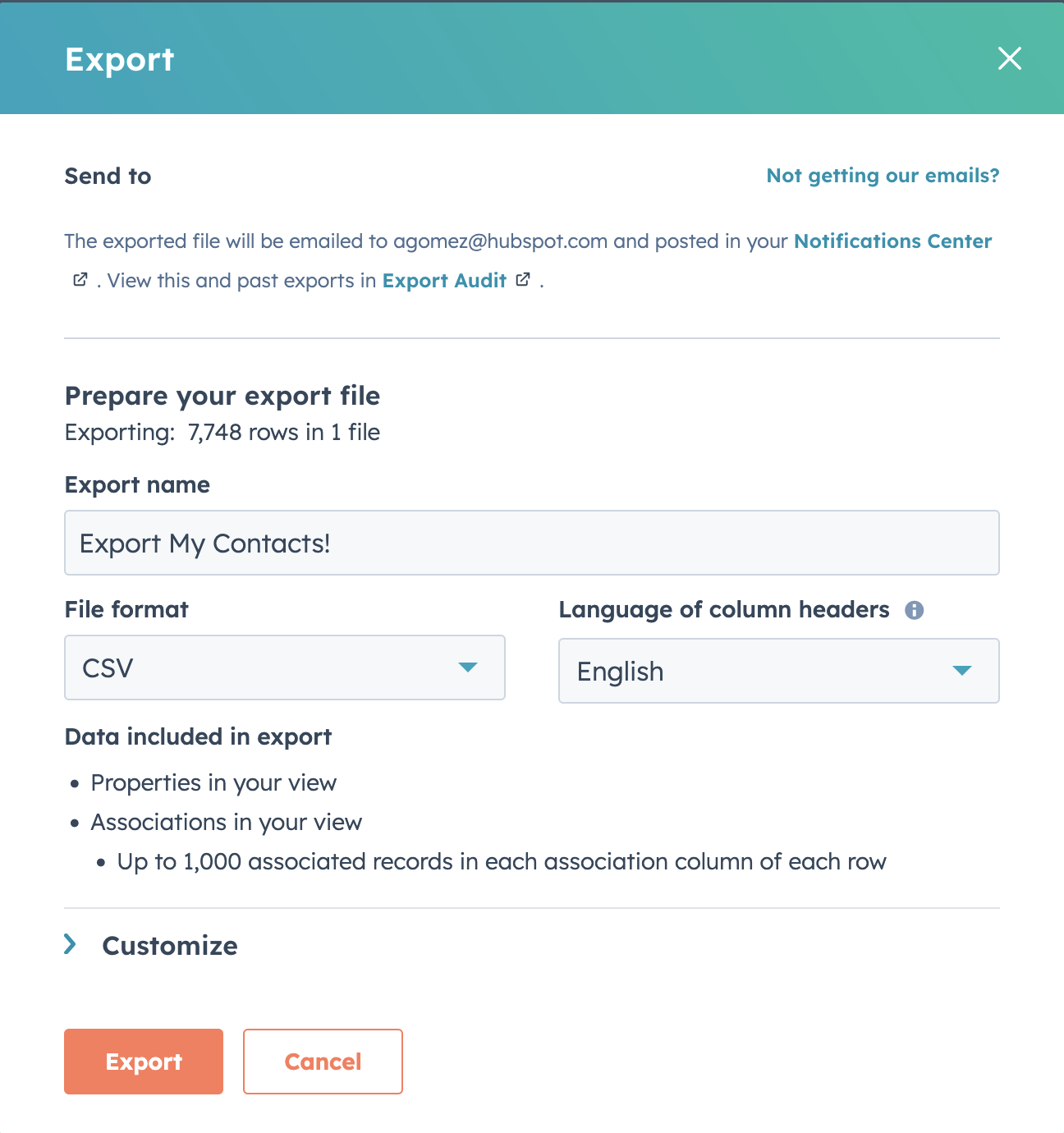
You can now edit the name of your CRM exports.
Previously, users were unable to edit the name of their exports -- it simply defaulted to the name of the index page view, list, or property history you were exporting. This made hunting down a specific export a big guessing game. Going forward, users will be able to name their exports so they're easily identifiable.
How does it work? When you go to export CRM data, you'll now see an editable field for the export name. You can use this field to rename your export whatever you'd like before proceeding.
Removing Associated Records Display Properties By Default in Export
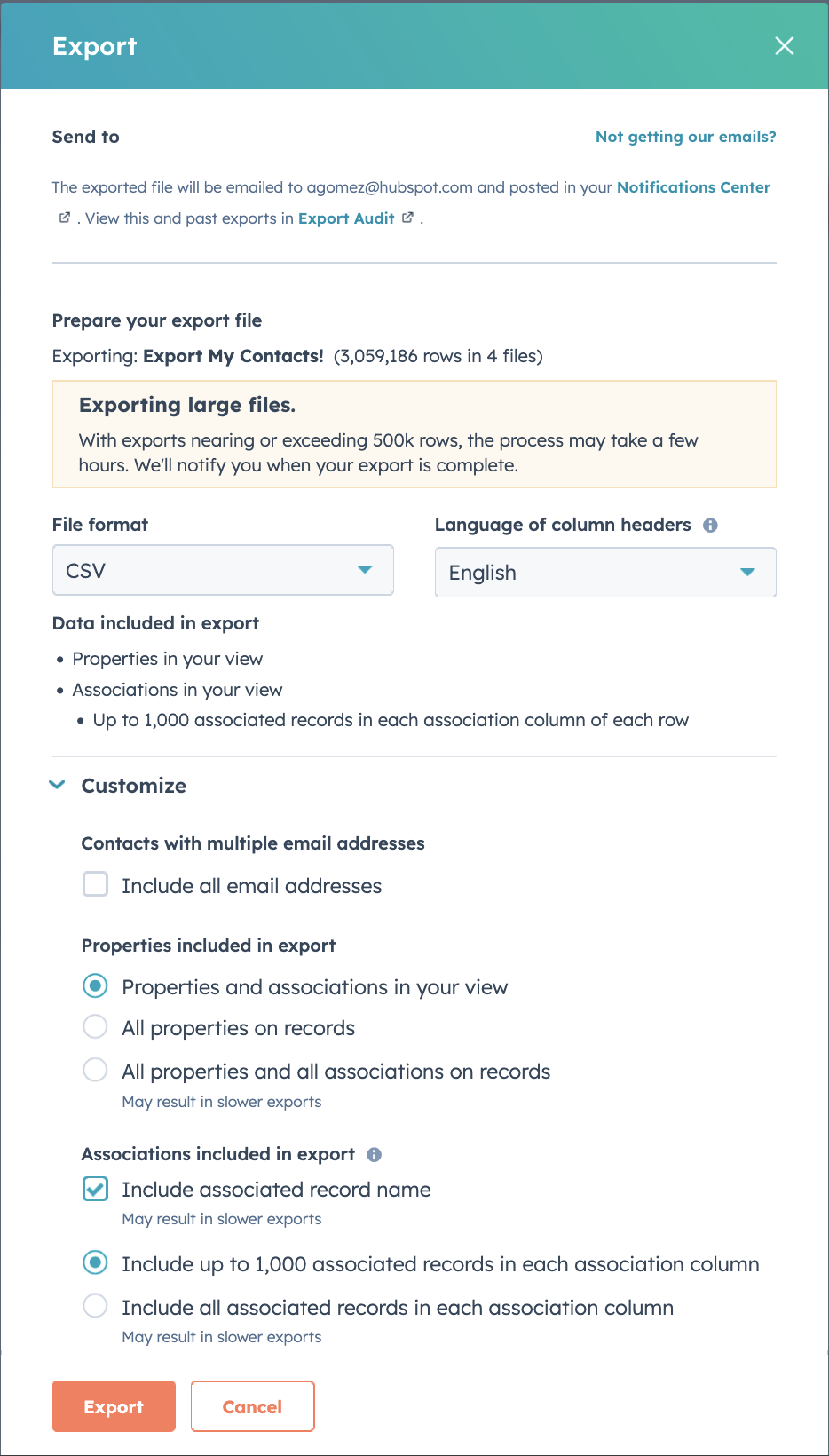
Going forward, HubSpot will not include the display property for associated records in exports by default. If you'd like to continue receiving this information in your exports, you can check the "Include associated record name" checkbox under the customization options in the export pop-up.
By removing the display properties for associated records in exports, the platform greatly increase the speed and performance of larger exports. For larger exports, removing this one column can save hours on your export -- getting you the data you need out of HubSpot faster.
How does it work? If your export includes associations with another CRM object, the default export will now only include a column for associated record IDs. If you wish to still receive a column with the name of associated records in your export file, simply check the box to "Include associated record names" under the customization options in the export pop-up.
Create and View Notes in Help Desk (Replacing Comments)
Support teams can now view, create, and edit notes in help desk, replacing comments as the primary means for internal collaboration in help desk. Notes are already the building blocks that power internal collaboration across the rest of the HubSpot platform, and now they power collaboration that takes place inside of help desk as well!
Since the release of help desk, HubSpot has heard consistent feedback that support teams are struggling to collaborate internally and with cross-functional stakeholders—like sales agents—when troubleshooting and resolving tickets. These changes will effectively replace comments with notes, addressing two of the biggest pain points our customers have shared:
Streamlining collaboration between help desk and the ticket record by making information consistent across both! The HubSpot team has heard a lot of frustration about comments (which live in help desk) and notes (which live in the ticket record)—and the fact that these two things aren’t synchronized. Consolidating the experience by using notes as the single source of truth for internal collaboration aligns help desk with the rest of the platform and makes it easier for teams to stay up-to-date.Users will be able to create notes on ‘blank’ tickets from help desk. The team has also heard a lot of feedback related to not being able to comment on a ticket in help desk unless an external, customer-facing communication thread has been started. This set of changes will remove this limitation.
How does it work?
Here are a few ways your team might leverage notes in help desk:
Creating a Note: Click into the “Notes” tab of the reply editor, add your content in the editor panel, and click “Create note”. The note will appear in help desk, in real time, alongside any other messages that have been sent or received from the customer.Editing a Note: Hover over the body text of an already published note, and click the pencil icon to edit it.Responding to a Note: To respond to a note directly with a nested comment, click "Add Comment" on a published note.Associating a Note with Other Records: If you'd like the note to appear on other record pages (for example, a contact or company record), update the associations using the "Associated with" dropdown in the note editor panel.Using Notes to Search for Tickets: You can search for tickets in the help desk search bar using keywords in notes.Viewing Note @Mentions: Tickets where you were @mentioned in a note or comment will appear in your "My Mentions" view.Getting Notified: Under Notifications settings, you can configure the following notes-related notifications (found under the Comments and Tickets sections). When turned on, these notifications will link users directly to the help desk ticket they pertain to. Check out this knowledge base article for more information on notifications .
Check out this knowledge base article for more details on creating, editing, and managing notes in help desk!
Please note: Slack, MS, and GChat Integrations have not yet been updated to support notes in help desk. If you have the Slack, Teams, or Google Chat help desk integrations set up, the experience will be degraded in the Private Beta. For this reason, we’d recommend holding off for a future iteration if your team uses any of these integrations (and will not approve requests for customers who have these integrations configured). Don’t worry—we’re already working on another update to address this!
Enhanced datetime property in Marketing Email
Starting April 16th, 2025, any datetime properties created in your HubSpot CRM now display both date AND time when used as personalization tokens in Marketing Hub emails.
With both date and time context, you can send truly personalized meeting reminders, event notifications, and confirmations that include exact times - creating clearer communication that drives better customer experiences.
How does it work?
In your HubSpot account, navigate to Marketing > Marketing Email .
Click the name of your email.
In the Email Editor, click a rich text module to insert a personalization token.
Place your cursor where you want to insert the personalization token, then click the Personalize dropdown menu in the rich text toolbar.
Click the Token dropdown menu, then use the search bar to select a Token . You can choose from any datetime properties you have created in your HubSpot account.
Set a default value for the token. The default value will be used when the contact does not have a value for that specific property. You can also set global default values for the tokens.
Click Insert . You'll see the token highlighted in the rich text module with the name of the selected datetime property.
Both the date and time stored in the property will be added to your Marketing Email.
Please Note:
The timezone of these property values will be based on your HubSpot Portal timezone, and not the timezone of the recipient of the email.
All datetime/date properties will continue to be compatible with HubL datetime filters/functions.
Any custom datetime property used in your Email will be changed from being rendered as date to datetime.
The format of the date in different locales won't be changed, and we will only append a time to the existing date format.
If you have HubL if/conditional logic that relies on custom date properties to be returned in a certain format, this will need to be adjusted to avoid the email rendering logic breaking.
Clarification to Allow/Deny List Behavior for Inbox & Help Desk
We have clarified the behavior for the Allow/Deny List for the case in which an email address/its domain appears in both the Allow and Deny List.
How does it work? If a domain (e.g. company.com ) is in the Deny list, but a single email address of that domain (e.g. person@company.com ) is in the Allow list, then incoming emails from person@company.com will be allowed.
If a domain (e.g. company.com ) is in the Allow list, but a single email address of that domain (e.g. person@company.com ) is in the Deny list, then incoming emails from person@company.com will be denied.
If a domain, or a single email address, is duplicated verbatim in the Allow and Deny list, HubSpot prioritizes the Allow list.
A new workflow creation experience
The create workflow process now starts directly in the workflow builder, with the ability to browse all available workflow triggers upfront.
>> Watch this 5 minute demo video to learn more! <<
In the past, when creating a workflow, the first step was to choose an object type. For newer users who hadn't yet learned HubSpot object terminology, the choice was overwhelming!
Even for experienced users, this meant committing to a specific object before confirming if the trigger you need will be available there.
If it wasn't, you may have assumed the feature didn't exist in workflows and miss out on an automation opportunity. At best, you'd need to go through the trouble of abandoning that workflow, creating a new one, and repeating that process until you found the trigger you needed.
With this change you'll go directly into the workflow builder after clicking "Create workflow", where you can immediately begin browsing all available workflow triggers!
You can more easily switch between different trigger options while in this flow, and maybe even discover some new triggers you didn't know existed!
When a trigger is selected in the new experience, HubSpot will set the workflow object type automatically, when possible, to save you time and clicks!
This update makes it easier for to you to find the best trigger for your process, while removing decision points with limitations that made it hard to get started.
How does it work? Navigate to the workflows app, and click to create a new workflow from scratch. From there, you can:
Search or browse through all available triggers
Select and configure a trigger.
If that trigger is only relevant to a specific type of object, we'll automatically set that for you.
If you choose a trigger that applies to multiple types of objects, we'll ask you to specify the object type as a second step.
Set up trigger refinement criteria, if applicable
Configure re-enrollment and un-enrollment settings, if applicable
Save your trigger, and move on to adding actions to your workflow!
If you aren't ready to set up your trigger, you can skip ahead by clicking "Skip and choose type of record..."
An object type does need to be set before actions can be added.
If you don't set up a trigger, the workflow will work for manual enrollment only, but an automated trigger can always be added later. For more detail on the functionality, see this knowledge base article and for more context on the change see this blog post .
Once you've joined the beta, you can toggle between the new and old experience using the green "beta" bubble in the bottom left hand corner of page while you're creating a new workflow.
Property History Exports Now Only Include Records Who Have Historically Had a Value for That Property
P r o perty hist o ry exp o rts w ill n o w o nly c o ntain the rec o rds that have a value f o r the pr o perty y o u are exp o rting.
Exporting a property's history gives you insight into how your CRM Data is changing over time. Previously, these exports included a row for every record of the property's object type. This meant that even if only 10 of your 200,000 contacts had a value for the property "Phone Number," your export would include 200K records/rows. By filtering this export down to only deliver the records that have a value for that property at one point in time, we'll make this export type much quicker.
How does it work? Navigating to Property Settings you can initiate a property history export by clicking the "More" dropdown next to any property. Once you execute the export, the file you receive will now only include a row for every record that has historically had a value for that property, instead of all records of that object type in the CRM.
Expanded automation issue management
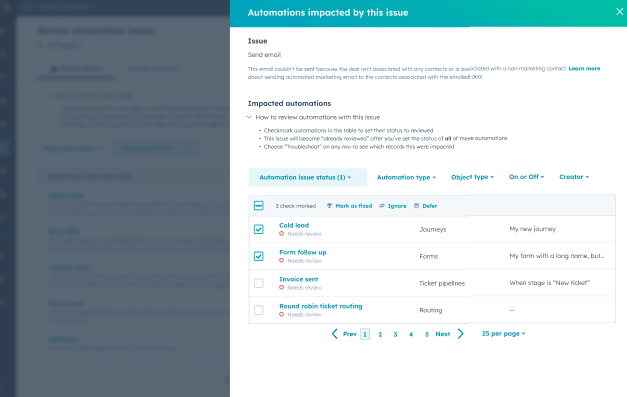
You can now effectively manage and troubleshoot any issues that arise across all automation tools in workflows, forms, pipelines, and more.
A key piece of automation management is easy, effective troubleshooting. With expanded automation issue detection and management, you now have a quick way to review all issues that may arise in any of HubSpot's automation tools - not just in workflows!
This means your automation - regardless of where it's built - is easier to monitor, and troubleshooting is faster.
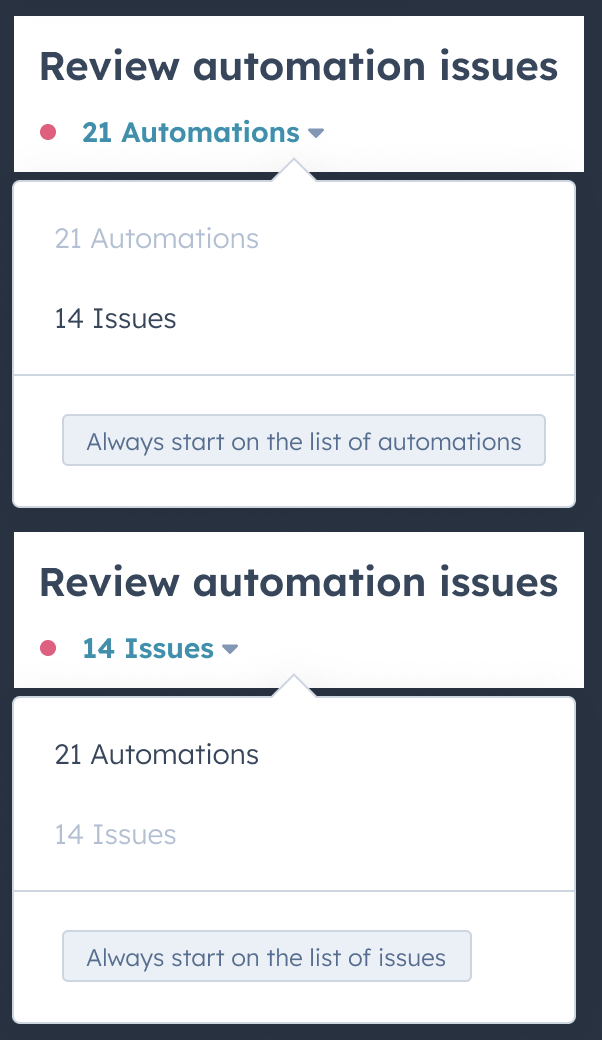
How does it work? Navigate to the Workflows or Journeys page, and select the new Review automation issues button.
Upon accessing automation issues, users can begin their review by selecting from two options in the dropdown menu. For convenience, users can also set their preferred option as the default.
The first option presents a list of automations with known issues, allowing users to select an automation and review all associated issues. The second option presents a list of issues within automations, enabling users to select an issue and review all affected automations. With this option, users can also bulk select multiple automations to resolve together.
To resolve an issue, users can choose to 'Mark an issue as fixed', 'Ignore' or 'Defer'.
Legacy Shopify Integration
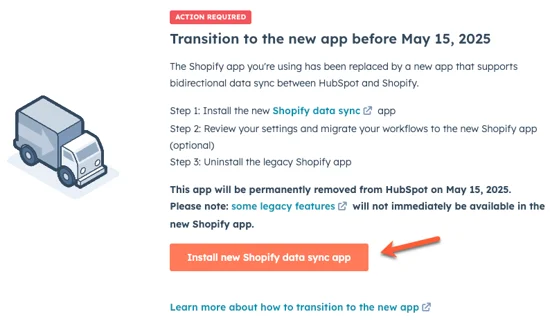
As previously announced on Feb 25th, HubSpot will discontinue support for the legacy version of the Shopify integration on May 15, 2025.
As a reminder, to ensure uninterrupted service, please install the new Shopify integration powered by Data Sync before this date.
A built-in migration wizard is available in the Shopify app within your HubSpot portal to guide you through the process of installing the new integration, migrating your workflows and sync settings, and uninstalling the legacy integration. For more detailed instructions, please refer to this knowledge base article .
How does it work? 1. Click on this link to your portal’s integration settings and navigate to the Shopify app.
2. You will be prompted with a migration wizard. Follow the instructions to get started with the migration flow:
Note: The legacy Shopify integration syncs Shopify orders and carts to HubSpot deals, while the new integration syncs Shopify orders to HubSpot orders and Shopify carts to HubSpot carts. If you are migrating to the new Shopify integration powered by Data Sync , you'll need to manually migrate some of your deal-based workflows to order- or cart-based workflows. Refer to the this knowledge base article for additional details .
3. Follow the guided steps to complete your migration.
If you don’t take these steps before May 15, 2025, your HubSpot account will no longer be connected to Shopify, which could result in disruption.

.webp?width=145&height=145&name=Hubspot%20Platinum%20(1).webp)